
Multi-city trips — from a full route to a detailed plan per city
Sketch a trip through several cities as one full route, then make a detailed plan for each city with its own day-by-day schedule.
A trip through several cities is hard to plan day by day from the start. It’s much easier to decide first how many days you’ll spend in each city, then fill in each city later. In Flex Trip Planner, you set the overall flow with a full route trip and create a detailed plan (a sub-trip) for each city, where you plan day by day.
Our example is an 8-day trip through Italy: Rome → Florence → Venice.
The app’s screens are in Korean. Below, button names are given in Korean with an English translation.
1. Set the order of cities with a full route
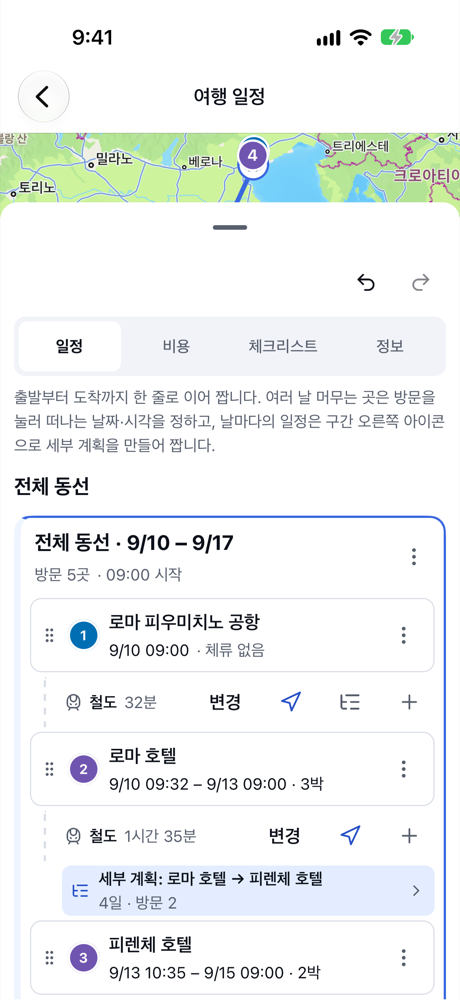
When you create the trip, choose 전체 동선 (Full route) as the plan type, and add each city’s hotel as a visit. Setting 떠나는 날짜·시각 (Leave date and time) on each hotel decides how many days you stay in each city. Add transport such as trains to the legs between cities.
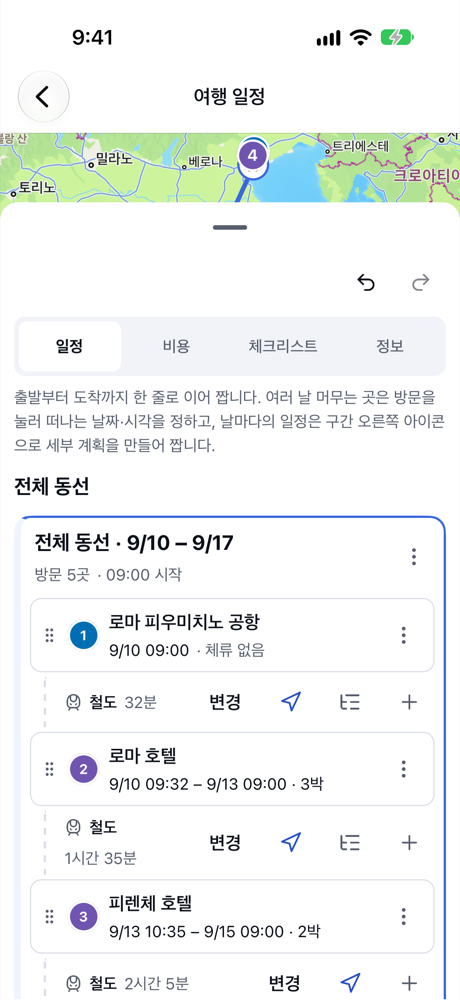
For more on full route trips, see Just the route — a simple trip planned as one full route.
2. Create a detailed plan for each city
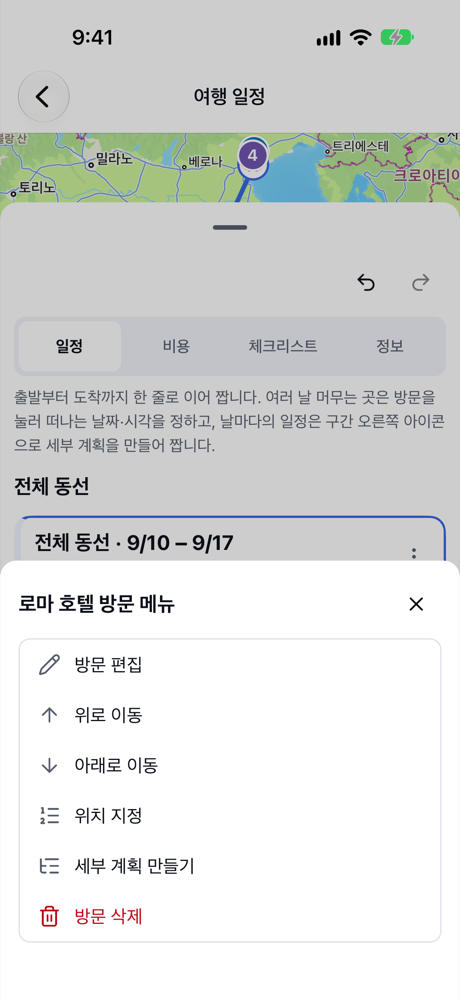
In the menu of the city’s hotel visit (say, Rome hotel), tap 세부 계획 만들기 (Create detailed plan). You can also tap the detailed plan icon at the right of the leg row.
In the 세부 계획 기간 (Detailed plan period) window, choose where the period ends.
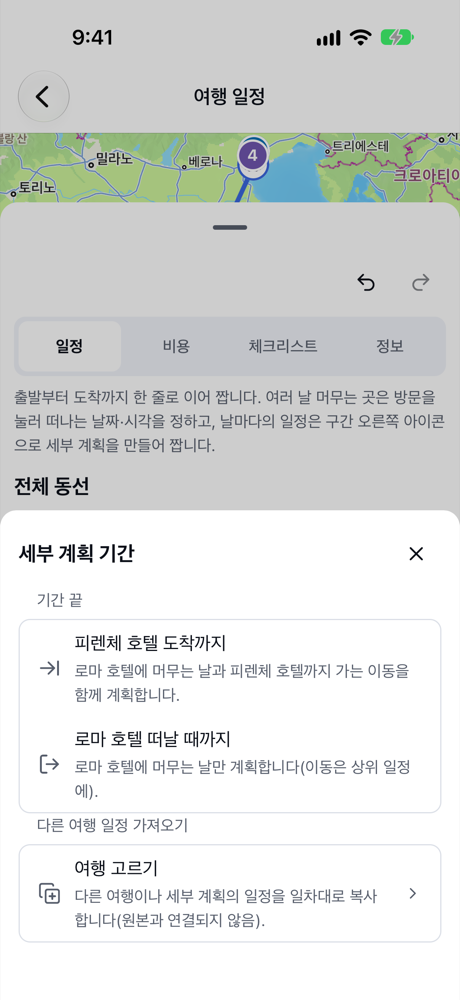
- 피렌체 호텔 도착까지 (Until arriving at Florence hotel) plans your days in Rome together with the trip to Florence.
- 로마 호텔 떠날 때까지 (Until leaving Rome hotel) plans only your days in Rome, and leaves the trip to Florence in the full route.
- If you already planned these days in another trip, 다른 여행 일정 가져오기 (Copy from another trip) copies that schedule day by day as a starting point.
3. Plan each day inside the detailed plan
A detailed plan opens as a daily trip with a card for each day in its period. It starts at that city’s hotel and ends by heading to the next city, and you add the places you want to see each day. Tap the path at the top (for example “이탈리아 8일 › 피렌체 호텔 → 베네치아 호텔”) to go back to the full route trip.
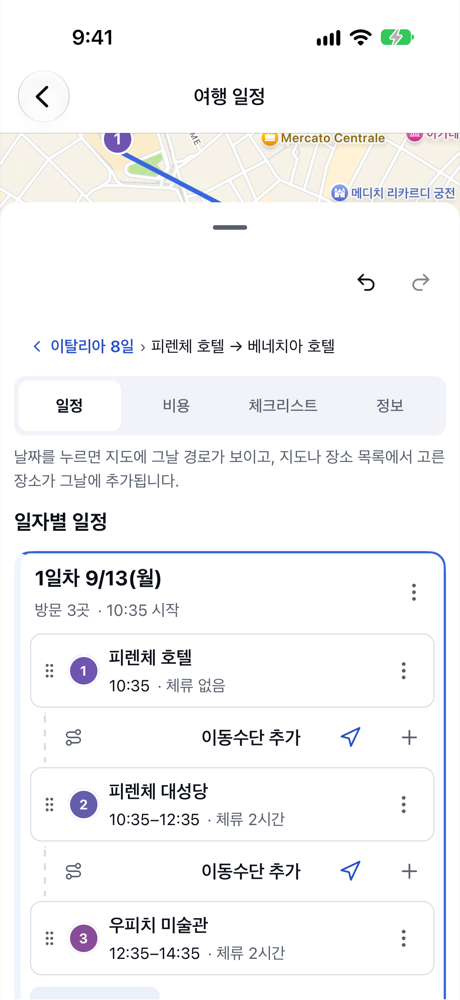
A detailed plan’s period follows the full route. If you change when you leave a hotel in the full route, the detailed plan’s period changes with it.
4. See it all from the full route
Back on the full route trip, the leg row shows 세부 계획: … (Detailed plan: …) below it, with its length and number of visits. Tap it to open that city’s plan. Do the same for each city, and you can manage both the big picture and each city’s days.
Summary
- For a multi-city trip, start with a full route to set the order of cities and how long you stay.
- Use 세부 계획 만들기 (Create detailed plan) in a hotel visit’s menu (or on the leg row) to plan each city day by day.
- Each detailed plan’s period follows the full route, and you open it straight from the link there.