
Just the route — a simple trip planned as one full route
Plan where to go and in what order as a single line, with no costs or minute-by-minute schedule. We use a 3-day trip to Busan as the example.
When you first sketch a trip, deciding where to go and in what order is often enough. With the full route plan type in Flex Trip Planner, you don’t split the trip into day cards. You plan everything from departure to arrival as one route, and you can leave fares, entry fees and times blank.
Our example is a 3-day trip to Busan, Korea: land at Gimhae Airport, stop at Haedong Yonggungsa Temple, spend two nights at a hotel in Haeundae, then visit Gamcheon Culture Village and Jagalchi Market before flying home.
The app’s screens are in Korean. Below, button names are given in Korean with an English translation.
1. Choose “full route” when you create the trip
On the Trips tab, tap 새 여행 (New trip) and enter a title, departure and arrival dates, and departure and arrival places. Under 계획 방식 (Plan type), choose 전체 동선 (Full route), then tap 여행 만들기 (Create trip).
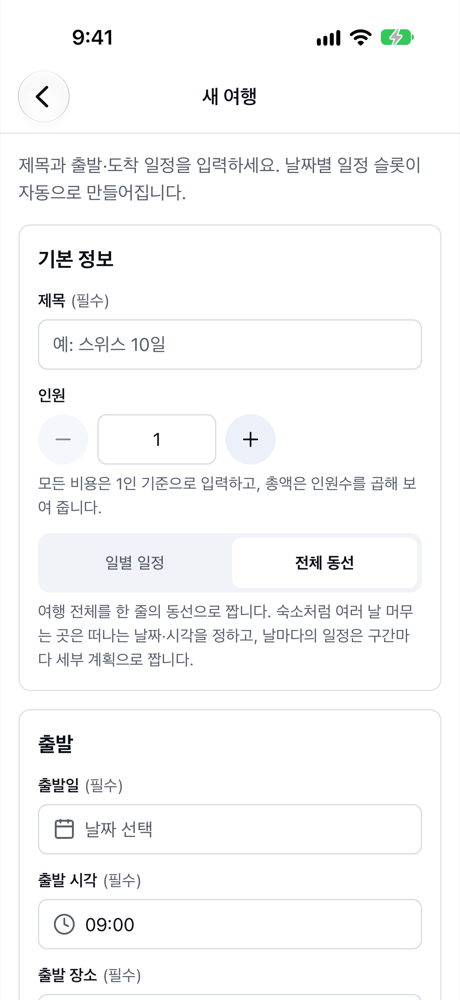
- 일별 일정 (Daily schedule) gives each day its own card, and you plan one day at a time.
- 전체 동선 (Full route) plans the whole trip as one line. For places you stay several days, such as a hotel, you only set when you leave.
- The plan type can’t be changed after you create the trip. If you want to start with the route only, start with full route.
2. Add the places in order
Your new trip has a single 전체 동선 (Full route) card on the schedule tab. Tap 방문 추가 (Add visit) to search for a place, or tap places on the map, one after another.
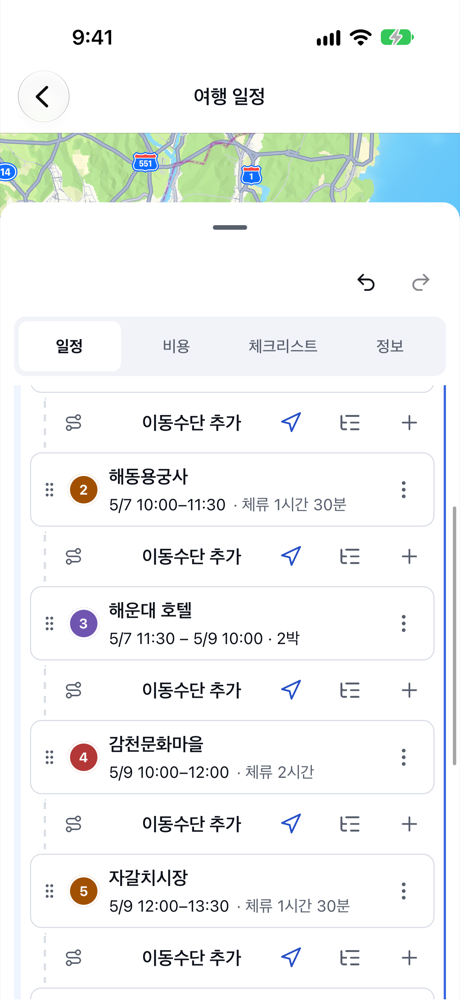
- Visits are numbered in the order you add them. To reorder, long-press and drag a visit, or use 위로 이동 (Move up) and 아래로 이동 (Move down) in its menu.
- You don’t have to add how you travel between visits. Anything you leave out simply stays blank, with no warnings.
3. For a hotel, just set when you leave
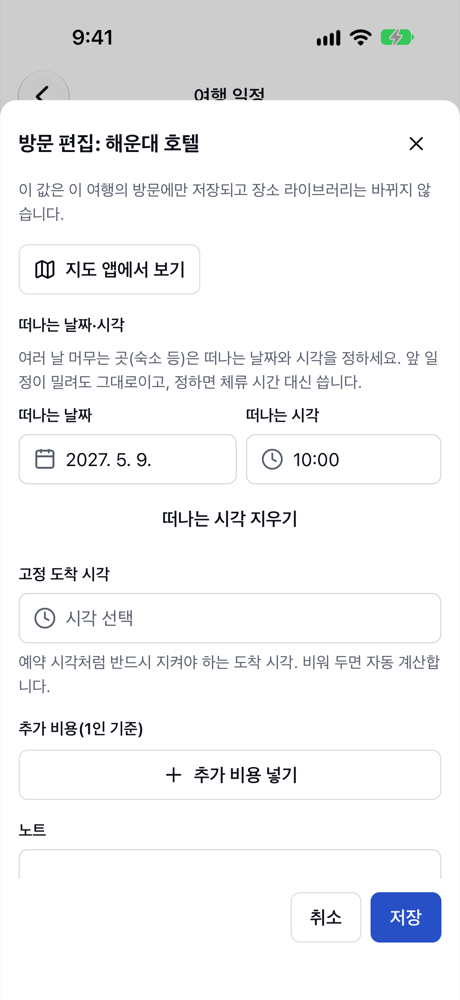
For a place you stay several days, like the Haeundae hotel, tap the visit to open the editor and set 떠나는 날짜·시각 (Leave date and time). The card then shows how long you stay, such as “2박” (2 nights), and the next visit continues after that time.
4. Check the route on the map
Tap the card and the map shows numbered pins, joined by lines in visit order. A full route trip has only one card, so you see the whole trip at once. Pull the sheet down for a bigger map.
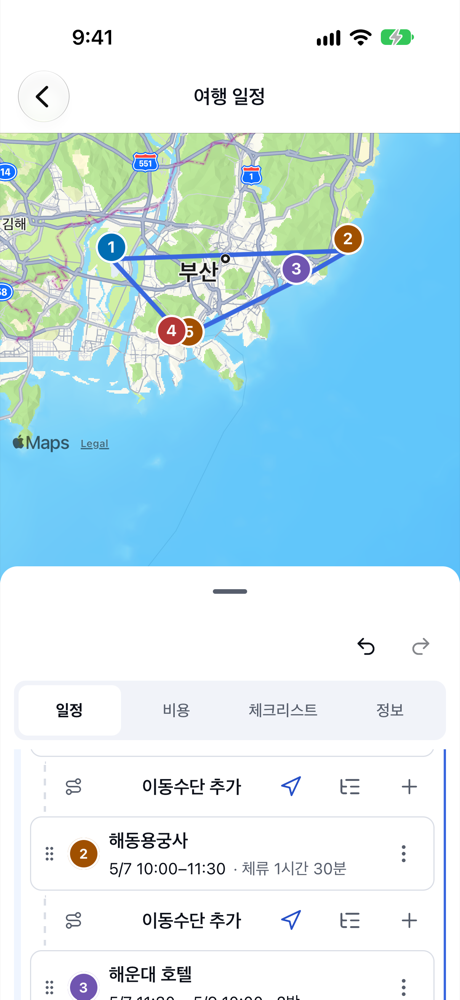
The lines on the map are straight lines joining the visits in order. To see the actual roads, use 길찾기 (Directions) in a visit’s menu to open an installed maps app.
Next steps
Once the route is set, add only as much detail as you need.
- To build a timetable with transport and travel times, see Add transport and times, and swap places when you run late.
- To plan each city’s days in detail, see Multi-city trips — from a full route to a detailed plan per city.
Summary
- Choose 전체 동선 (Full route) to plan the whole trip as one line.
- Add visits in order, and for multi-day stays set only 떠나는 날짜·시각 (Leave date and time).
- You can leave costs and transport blank, and see the whole route on the map.